The User Guide for Puke
What is stopping you from being productive?
a good puke
and cat photos of course
Features
Manage Tasks
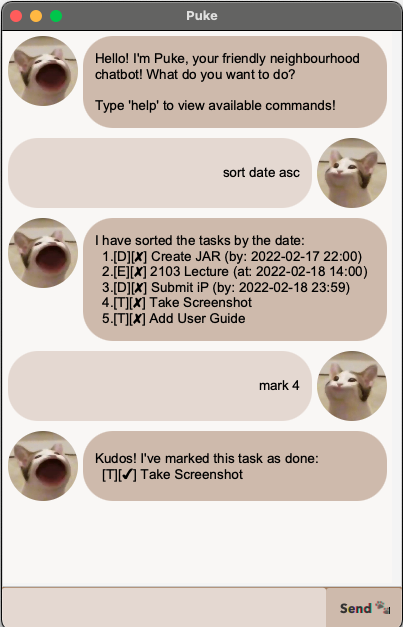
Puke allows you to manage THREE types of tasks: Todo, Deadline and Event. Comes with operations such as adding, deleting, marking, sorting, and much more! The complete list of features is below.
Cat Therapy
Just by simply looking at the beautiful interface, you will feel motivated to actually complete your tasks. Remember, you have 99 problems but at least task management ain’t one.
Download
To get started on Puke-ing, simple download the JAR file, place it in an empty folder and double click it to run!
Note that Puke requires Java 11 to run.
Commands
Note that all commands are case-sensitive
list - View the list of tasks
todo - Adds a ‘to-do’ task
To-do tasks do not have any date/time!
Usage: todo [task name]
deadline - Adds a ‘deadline’ task
A deadline has a specified deadline to complete by.
Usage: deadline [task name] \by [date time]
The format of date time should be ‘yyyy-mm-dd hh:mm’.
event - Adds an ‘event’ task
An event has a specified date and time when it happens.
Usage: event [task name] \by [date time]
The format of date time should be ‘yyyy-mm-dd hh:mm’.
mark - Marks a task as done
Usage: mark [task number]
The task number can be checked with list.
unmark - Unmarks a task as done
Usage: unmark [task number]
The task number can be checked with list.
delete - Deletes a task
Usage: delete [task number]
The task number can be checked with list.
find - Finds a task by a keyword in the name
Usage: find [keyword]
Note that the keyword doesn’t have to match by a whole word.
sort - Sorts the list of tasks
Usage: sort [by] (order)
[by] can either be date, name or type
For sorting by date and name, you can specify asc or dsc to sort by ascending or descending order.
help - View user guide
Usage: help (command)
You can optionally add in the command to vie the guide for.